The English coastline, near Sittingbourne, Kent captured by Jason Hawkes
While Jason hails from the United Kingdom, his work spans the globe. Simply open the KML in Google Earth, and you’ll feel like you’ve taken a seat right next to him as he flies over the United Kingdom, New York, Las Vegas, Hong Kong, Budapest and Minorca.
The Great Sphinx at Luxor in Las Vegas, Nevada
Given the excitement around London this summer, we included a variety of photographs that bring the changing face of the city to life, from the addition of The Shard skyscraper to the massive redevelopment taking place in Stratford for the Olympic games.
The Shard and River Thames in London, England
The Olympic Park in London, England
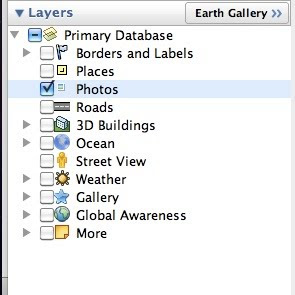
When viewing the KML in Google Earth, make sure the “3D Buildings” layer is enabled in the left hand panel to enjoy a 3D experience of famous buildings. Happy flying!
Posted by Phil Verney, Program Manager, Google Earth and Maps
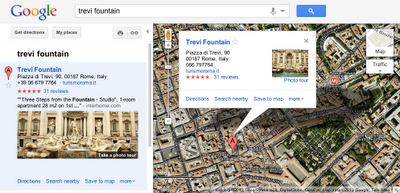
Photo tours are available for more than 15,000 popular sites around the world, from famous landmarks such as St. Mark’s Basilica in Italy to scenic treasures like Half Dome in Yosemite. They can be initiated from Google Maps in two ways. First, when you search for a place, such as Trevi Fountain, the results in the left panel will indicate if there is a photo tour available: click either the thumbnail image or the link to start the tour. Alternatively, if you’re browsing the map and click on the label for a particular landmark, the info window that appears will indicate if a photo tour is available.
To produce these photo tours, we use advanced computer vision techniques to create a 3D experience from public, user-contributed Picasa and Panaromio photos. We start by finding clusters of overlapping photos around major landmarks. From the photos, our system derives the 3D shape of each landmark and computes the location and orientation of each photo. Google Maps then selects a path through the best images, and adds 3D transitions to seamlessly guide you from photo to photo as if you’re literally flying around the landmark and viewing it from different perspectives.
Every photo is attributed to its contributor, and the more photos people share, the better the tours get. So if you have great photos of places you’ve visited on Picasa or Panoramio, make them public so they’ll be eligible for inclusion in these photo tours!
If you’re not familiar with Panoramio and how it works, get a sense for this powerful user tool by checking out the brief video below. Panoramio is a community site for photos of various places, with the option to share and explore the photos in Google Maps and Google Earth.
Enjoy the improved features in Panoramio and we look forward to seeing more of your photos.
Posted by Gerard Sanz, Panoramio Community Manager
For example, in my trips around the world, I always take the time to enjoy the local cuisine, like Costa Brava’s arròs negre. So I created a group called “Food,” to give others a "taste" of that region and get a glimpse of what fellow foodies are feasting on. My fellow group members—and by all means I hope you’ll become one of them!—can add their own photos, browse others' and get culinary and travel inspiration.
Panoramio Groups allow members to share photos and start discussions on a given topic.
To share your own interests and passions through photos, hop over to Panoramio and create your own group or join an existing one from the Groups Directory. You can show off your photos of your favorite restaurant, the most beautiful sunset you’ve seen, the latest lighthouse you’ve visited, or the cutest dog from each continent. Whatever it is, try starting a discussion about your favorite topics and share what matters to you with others.
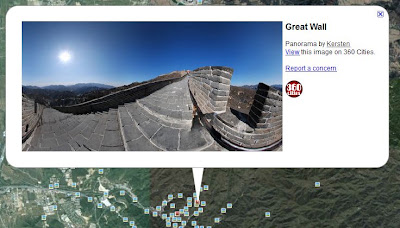
To see the 360 degree view, click on the center picture in the balloon and it will take you into the panoramas. If you wish to view the post earthquake panoramas only, download this KML collection and open it in Google Earth.
These panoramas were taken as part of a non-profit Japan Pano Journalism Project, which aimed to document the 2011 Japan Earthquake damage and recovery with 360º panoramic photography.
Posted by Wei Luo, Technical Lead/Manager, Google Earth
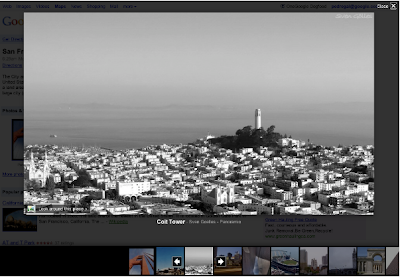
As an example below, check out the Golden Gate Bridge in San Francisco, CA. You will see photo icons on top of the satellite images. The larger photo icons indicate larger collections or clusters of photos. Click on any photo icon to open the Photos window.
To browse through the images in a collection, click on a photo in the filmstrip and use the “left” and “right” arrow keys on your keyboard to flip through them quickly.
Whether you’re deciding between Paris, Beijing or Venice for a nice vacation or simply want to go on a quick virtual getaway after a long day, we hope this new way of viewing photos in Google Earth helps bring places around the world to your fingertips.
If you’d like to contribute to our efforts of building a virtual atlas of the real world and have amazing photos you’d like to share, you can do so by uploading them to Panoramio.com.
Thanks to Google Latitude, my photos were geotagged just after uploading them in Panoramio. The day was great, snow was perfect, weather was amazing and when I arrived home my photos were already geo-positioned.
For more information about this feature please check our help content and as always we will be happy to hear your feedback in the Panoramio forum.
Posted by Gerard Sanz, Panoramio Community Manager
A few months ago, we launched an improved photo viewer for Place pages to help you quickly and easily explore images of locations all over the world. Starting today, you can also contribute your own photos of places you've been to the growing collection of high-quality photos across the web.
The “Photos” section of the Place page now includes an "Upload a photo" link. This new link enables you to select an original photo on your computer and easily add it to the group of photos in the gallery.
The most useful photos are descriptive ones that help others experience or envision a place before they visit it in person. It might be a close-up of a popular dish, a wide shot of a business interior, or a picture of the outside of the building.
Photos that comply with our review guidelines will be available in Place page results for that particular business for you and any other potential customers to see. Users will also be able to explore these photos in search results across Google, Google Maps and Google Earth.
We’re eager to see the variety of photo styles and images our users share for everyone to view and enjoy.
Suppose you’re planning to meet your friend for a concert at the Greek Theater in Berkeley, and you want driving directions to plan your trip from your apartment in San Francisco. When accessing Google Maps, you’ll see a new widget in the upper right corner that allows you to easily select from either the Maps, satellite or Earth view. In addition, the single widget icon showcases all the different layers available to you, enabling you to quickly see more detailed information just by mousing over the ones you want.
Since it’s nearly rush hour and traffic information would be useful, you select that layer by clicking on it in the widget:
Unfortunately, the traffic layer shows that there are heavy delays along your route. You wonder if taking public transit is a better option, so you turn off the traffic layer by clicking on it again, and turn on the transit layer instead:
Ah, it looks like there’s a Bay Area Rapid Transit (BART) station near your apartment and one near the Greek Theatre. Public transit it is! If you also want to find a local spot to grab dinner after the show, you could search for [restaurants] in the same Google Maps window. Your recently viewed searches will appear in the new widget, enabling you to easily see both your destination and search results at the same time. This makes it easy to find a place nearby.
We hope this new all-inclusive widget for accessing map types, layers and recently viewed searches improves your experience exploring and navigating to the places you want to go!
Update (1/20): Sorry for the delay, but the new widget for viewing map types, layers and recent searches will be available soon. We'll update this post again when the widget is live.
Update (1/24): The widget is now live for all users on Google Maps. We hope you’ll enjoy exploring all the useful information available right on the map!
These panoramic photos are shot by average people just like you and me. To contribute your panoramic photos, visit 360cities.net. We invite all users to become part of the community and mark your photo journey in Google Earth.
Check out some of the beautiful images now available right in Google Earth.
Business owners who worked directly with our photographers across these three regions will see the photos from Google on their Place page within the coming weeks. Thanks to all of you who welcomed us into your businesses. We’re continuing to take photos at more business locations, and urge others to let us know if you’d like us to visit you as well.
In the meantime, you can also upload your own photos and videos of your business by signing in to Google Places. By building out your Place page with visuals and other relevant business information - such as hours of operation, offers and more - you’ll help potential customers learn more about you and feel like they know what to expect when they actually walk through your doors.








 Follow
