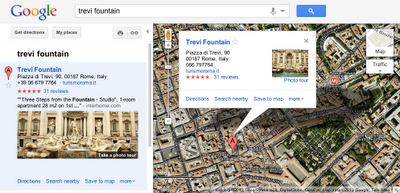
Photo tours are available for more than 15,000 popular sites around the world, from famous landmarks such as St. Mark’s Basilica in Italy to scenic treasures like Half Dome in Yosemite. They can be initiated from Google Maps in two ways. First, when you search for a place, such as Trevi Fountain, the results in the left panel will indicate if there is a photo tour available: click either the thumbnail image or the link to start the tour. Alternatively, if you’re browsing the map and click on the label for a particular landmark, the info window that appears will indicate if a photo tour is available.
To produce these photo tours, we use advanced computer vision techniques to create a 3D experience from public, user-contributed Picasa and Panaromio photos. We start by finding clusters of overlapping photos around major landmarks. From the photos, our system derives the 3D shape of each landmark and computes the location and orientation of each photo. Google Maps then selects a path through the best images, and adds 3D transitions to seamlessly guide you from photo to photo as if you’re literally flying around the landmark and viewing it from different perspectives.
Every photo is attributed to its contributor, and the more photos people share, the better the tours get. So if you have great photos of places you’ve visited on Picasa or Panoramio, make them public so they’ll be eligible for inclusion in these photo tours!
If you’re not familiar with Panoramio and how it works, get a sense for this powerful user tool by checking out the brief video below. Panoramio is a community site for photos of various places, with the option to share and explore the photos in Google Maps and Google Earth.
Enjoy the improved features in Panoramio and we look forward to seeing more of your photos.
Posted by Gerard Sanz, Panoramio Community Manager
The summit was an exciting opportunity for many of our top contributors to share their geographic crowd-sourced efforts, work directly with Google engineers to brainstorm potential new product features, and set strategies for improving the overall Geo community. Attendees also had a chance to mind-meld with our product leaders during a day of unconference sessions, sharing thoughts, ideas, and stories about their experiences that will help us to improve our products.
Following a keynote address by Aidan Chopra, Google Geo Evangelist, attendees shared their inspiring projects and practices with a rapt audience. We learned from Levan Beruchashvili how the National Agency of Public Registry helped map the entire country of Georgia for its recent graduation to Google Maps. Arek Pawlowski described hosting multiple SketchUp workshops at his university, creating almost 450 models in an ongoing effort to put all of Toruń, Poland into 3D. As it is the user-generated content that fuels the Google Geo products, these and other contributor testimonials stood out as the highlight of the summit.
Attendees at the Google Geo User Summit Barcelona!
To learn more about the Google Geo User Summit Barcelona, visit the event website, where you can browse photographs of the conference and its beautiful setting along the Mediterranean coast. Extensive session notes and user presentations are also available. If you’re interested in attending future events, please see the Map Maker Events Calendar, 3D Events Calendar and Panoramio Events Calendar. This summit was one exciting part of an ongoing celebration of the passionate mappers, modelers, and photo contributors who are improving Google Maps and Google Earth for the world to share. A tremendous thanks to all those who attended and helped make the event a success!
Posted by Lori Savageau, Community Manager, Google Map Maker
For example, in my trips around the world, I always take the time to enjoy the local cuisine, like Costa Brava’s arròs negre. So I created a group called “Food,” to give others a "taste" of that region and get a glimpse of what fellow foodies are feasting on. My fellow group members—and by all means I hope you’ll become one of them!—can add their own photos, browse others' and get culinary and travel inspiration.
Panoramio Groups allow members to share photos and start discussions on a given topic.
To share your own interests and passions through photos, hop over to Panoramio and create your own group or join an existing one from the Groups Directory. You can show off your photos of your favorite restaurant, the most beautiful sunset you’ve seen, the latest lighthouse you’ve visited, or the cutest dog from each continent. Whatever it is, try starting a discussion about your favorite topics and share what matters to you with others.
The summit was an opportunity for our most active contributing users to come together to learn, teach and share best practices with one another. A Map Maker workshop brought everyone up to speed on solid mapping practices and ways to add that next level of comprehensiveness to the map. Google reviewers also made the trip to Mountain View, CA to connect directly with users and give them the inside scoop on what goes into reviewing an incredible number of mapping edits each day, while offering insight to both new and experienced mappers. The user-generated unconference sessions also gave everyone a chance to troubleshoot, voice ideas, and brainstorm potential new product features with Googlers. There was also plenty of playtime, including an RC Car Scavenger Hunt, which had teams of summit attendees chasing remote controlled toy cars to points of interest across the Google campus. Ultimately, however, the event served as a forum for users to share their amazing and inspiring stories with fellow members of the Geo community.
Geo users mark their place on the map
Hearing their stories and perspectives was definitely the highlight of the summit. For example, Sophia Sallas-Brookwell, an undergraduate at the University of Chicago, introduced her plan to implement Map Maker as a means of addressing the inequitable distribution of healthy food options in Chicago’s South Side. Educator Jon Walker described his extensive use of mapping and 3D modeling in his Gresham, Oregon classroom, and how he encourages his high school students to leave a thoughtful footprint in the world. Many other users also shared their tips, tricks, and motivations, igniting a noticeable enthusiasm among attendees.
Googlers and Geo users join forces on Google’s Mountain View Crittenden Campus
If you weren’t among the crowd at this summer’s U.S. Geo User Summit, feel free to visit the event website, where you can browse photos of featured speakers, brainstorming sessions, and RC toy cars escaping into the sunset. Extensive session notes and presentations are also available. If you’re interested in attending future events, please see the Map Maker Events Calendar, 3D Events Calendar and Panoramio Events Calendar. This summit was just the beginning of an ongoing celebration of the passionate mappers, modelers, and photo contributors around the world.
Posted by Lori Savageau, Community Manager, Google Map Maker
Map Maker Software Engineer Robin Anil answers questions during a Q & A session.
The summit celebrated top mappers, modelers and photo contributors by asking individuals to tell their stories, brainstorm potential new product features directly with Google engineers during the unconference sessions, as well as make plans for events in the forthcoming year. We learned that India mapper CNR wakes up at 4:30am every morning to map. Pakistan mappers Faraz, Jabran and Omer worked together over the course of two years to map the roads of their country. They even turned Google Calendar into a way to track who was mapping what, and when! Thanks to the efforts of Map Maker contributors throughout the Asia Pacific region, more than a quarter of a billion people now have detailed online maps of the places they live.
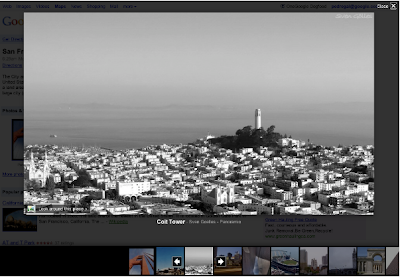
As an example below, check out the Golden Gate Bridge in San Francisco, CA. You will see photo icons on top of the satellite images. The larger photo icons indicate larger collections or clusters of photos. Click on any photo icon to open the Photos window.
To browse through the images in a collection, click on a photo in the filmstrip and use the “left” and “right” arrow keys on your keyboard to flip through them quickly.
Whether you’re deciding between Paris, Beijing or Venice for a nice vacation or simply want to go on a quick virtual getaway after a long day, we hope this new way of viewing photos in Google Earth helps bring places around the world to your fingertips.
If you’d like to contribute to our efforts of building a virtual atlas of the real world and have amazing photos you’d like to share, you can do so by uploading them to Panoramio.com.
Thanks to Google Latitude, my photos were geotagged just after uploading them in Panoramio. The day was great, snow was perfect, weather was amazing and when I arrived home my photos were already geo-positioned.
For more information about this feature please check our help content and as always we will be happy to hear your feedback in the Panoramio forum.
Posted by Gerard Sanz, Panoramio Community Manager
Clicking again on the highlighted orb in the user photo above will show you a close-up photo of the details on the building's facade:
You'll find that there are two kinds of orbs: ones that allow you to zoom, and ones along the border of the image that allow you to pan around the location. We wanted to make the experience of navigating user photos more consistent with the smooth Street View experience you know and love, so you can now also drag anywhere in an image to pan. As you click and drag the photo, you'll see the next picture transition into view:
Besides coming from Street View, you can also get to user photos using the Photo Layer in Google Maps (under the 'More' button). For instance, following this this link you can get to a cool view of the plaza from a tower, and then you can easily browse to other photographs also taken from the tower. You should try it out for yourself to really get the feel for this seamless new navigation experience, but here's a short video that will also give you a walk-through of this feature:
Our personal suggestion is that you start at the Sagrada Familia in Barcelona. We hope you enjoy this new way to explore through the impressive array of user photos in Street View!
Posted by Daniel Filip and Daniel Cotting, Computer Vision Team, Google Zürich






 Follow
