mpdq
Automatic MPD "smart playlist" creator with minimal but hackable setup.
Project maintained by uriel1998 Hosted on GitHub Pages — Theme by mattgraham
mpdq
Automatic MPD playlist or party mode creator to provide weighted randomness while autoqueuing MPD without relying on external services.
Contents
1. About
mpdq is a auto-queing system for MPD to create a flexible and configurable
“party mode” effect with randomization and (re)discovery of your own music.
Inspired by the eclectic soundtracks of Letterkenny, High Fidelity,
Doom Patrol, and many more.
(In-depth explanation at my blog).
mpdq will autoqueue random tracks from your existing music library,
with per-genre weighting and simple defaults.
Because it uses mpd’s own data, new tracks and changes to your music library
will be incorporated when mpd is updated.
Change from prior versions!
The program has been rewritten for simplicity and to avoid subprocesses; each run
will fill the queue up to the configured queuesize. Adding a self-contained idle
loop is still in the roadmap.
Station switching is also supported, including an interactive chooser when fzf
is available.
2. License
This project is licensed under the MIT License. For the full license, see LICENSE.
3. Prerequisites
These are probably already installed or are easily available from your distro on linux-like distros:
Optional:
- fzf for interactive station selection
mpdq now gets song length, album, and artist information directly from mpd
through mpc, so ffmpeg, exiftool, and mp3info are no longer required.
4. Installation
mpdq looks for its configuration in this order:
./mpdq.iniin the script directory./config/mpdq.iniif./configexists and is writable$XDG_CONFIG_HOME/mpdq/mpdq.ini~/.config/mpdq/mpdq.ini
An example config:
musicdir=/directory/to/music
mpdserver=localhost
mpdport=6600
mpdpass=
songlength=900
queuesize=10
# in hours
rotate_time=8
no_replay_rotate=8
# in minutes
album_mins=15
artist_mins=15
# Genres to exclude from the below two checks
genres_exclude_album_check=Sound Clip,Classical
# set to 1 if mpdq cannot stat the same files MPD sees
remote=0
If ./local/state or ./cache exist and are writable in the script directory,
mpdq will prefer those for runtime files; otherwise it falls back to the XDG
state/cache locations.
5. Setup
From the config file
rotate_time in the config file defines how long mpdq keeps the per-genre log
in hours – and helps define how often each genre will be played.
no_replay_rotate defines how long you will not hear a particular track again
in hours, like how radio stations used to promise you would not hear the same
song twice in a workday. This checks the track filename not the title.
album_mins and artist_mins will separately define the minimum interval
in minutes before a specific album or artist will be played again. These should
be shorter than no_replay_rotate.
genres_exclude_album_check is a list of genres where the album_mins and
artist_mins checks will be disabled, for example, if you have a genre with
only one or two artists or albums in it.
If remote=1, mpdq will skip checking the local filesystem for the candidate
track. This is useful when mpd is remote or sees the library through a
different path than the machine running mpdq.
Instruction files
The behavior of mpdq is governed by simple instruction files, as many (or
few) as you desire. The location of the instruction file does not matter, and
may be specified on the command line with -c. Without an instruction file,
mpdq will just shuffle through your entire library with an equal weight to each
genre.
Each instruction file is a series of lines in the format genre=weight like so:
Default=1
Rock=3
Classical=0
That “weight” is the maximum number of times that genre will be played in
the interval you put for rotate_time in the config file. The Default line
is applied to all genres that are not explicitly named in the instruction file.
In the example above, all genres will be played a maximum of 1 time per rotate_time,
except Rock, which may be played up to three times per rotate_time, and Classical,
which will never be played per rotate_time.
Additionally, the weight also increases the chance of that genre being selected at all, so the configured “station” character is felt sooner instead of only after the log has built up.
This allows for both very eclectic selections (as with the example above) or very focused selections, such as with the example below:
Default=0
Industrial=1
Gothic=1
Capitalization Matters
mpdq can also create an example instruction file with all genres listed so
that you can check your genre names properly. It will not hurt to have all the
genres listed, but it is totally unneeded.
If the instruction default.cfg exists in the configuration directory, it will
automatically be used. If that file does not exist, the default value (1) will
be applied to all genres.
Station files
Station files are just instruction files kept in the config directory as
named presets, for example General_mix.cfg.
-c station_name copies that station file to default.cfg, nothing more.
-s station_name changes to that station, copies it to default.cfg, clears
the current song logs, optionally adds a random track from the Bumper genre,
and then fills the queue.
If fzf is installed, both -s and station-style -c can also open an
interactive chooser when the requested station is not matched directly.
6. Usage
mpdq [-c /path/to/file|-c station_name][-s station_name][-efhl]
mpdq has the following command line switches:
-c FILE: Use an explicit instruction file from any path-c STATION: Change to a station config by name, or choose interactively-s STATION: Change to a station config by name, or choose interactively-e: Create an example instruction file at the config directory asdefault_example.cfg-f: Force MPD to have the right playback settings-h: Show a short help message-l,--loud: Give more feedback to terminal (yes, this means the default is quiet mode)
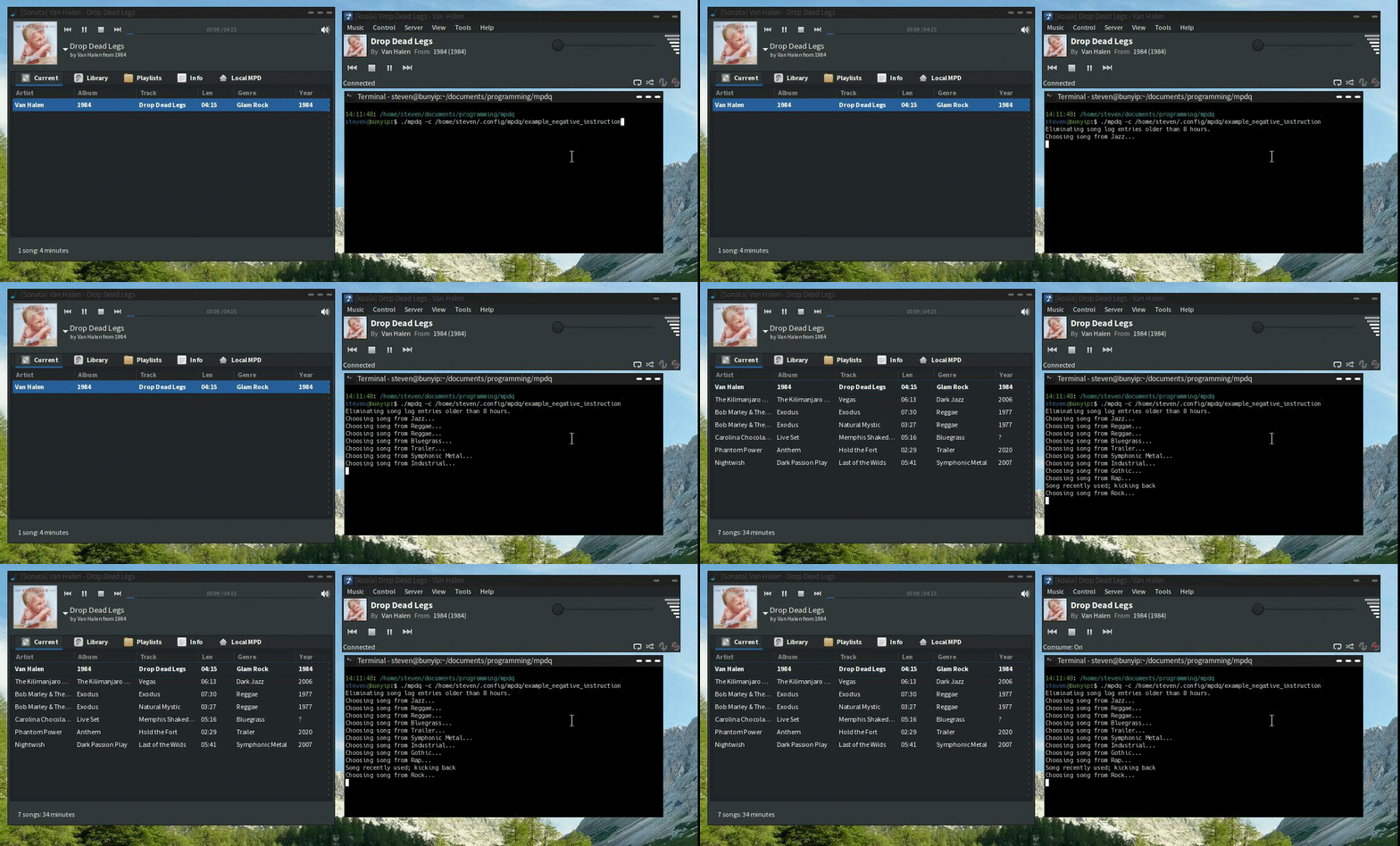
It should be run as a single-run process or using watch (e.g. watch -n 60 mpdq).
With each run, mpdq will add tracks to the MPD queue until the queue reaches
queuesize, and then exit.
- If
mpdq.iniis set up properly, you can do “random mode” by runningmpdqby itself. - If you have
default.cfgset up as well, you can just runmpdqwith no switches. - If you want to point at a one-off instruction file anywhere on disk, use
-c /full/path/to/file.cfg.
Because you define the hostname, it does not have to be on the same machine
running MPD. If remote=0, mpdq will still check file existence locally, so
you will need an identical music library structure. For example, I use a shared
NFS mount. If that does not apply, set remote=1.
mpdq logs what songs it has played, and will not repeat the same song, album,
or artist during the time periods specified in the config file. It does not
log songs played or added in any other way.
If mpdq exhausts all available options, it will do an emergency rotation of
both logs and tighten the effective lookback window further each time that
happens, resetting that emergency behavior once a valid song is selected.
mpdq will not add any tracks to the queue unless:
- random is off
- repeat is off
- consume is on
If you toggle any of those, then mpdq will do nothing.
Advanced Usage
With single-run mode, mpdq reads from the instruction file with each run. This
means that you can create different instruction files and either copy them to
default.cfg or use the -c switch to change your upcoming (random-ish) music.
7. TODO
- Add loop back in
- Switch between loop mode and single-run mode
- Lighterweight way to handle log rotation, since I’m calling it frequently?
Steven Saus injects people with radioactivity for his day job, but only to serve the forces of good.
Mostly.


