
Where government policy meets citizen voice — AI bridges the gap, understands both sides, and delivers an informed decision.



🚀 Live Demo ·
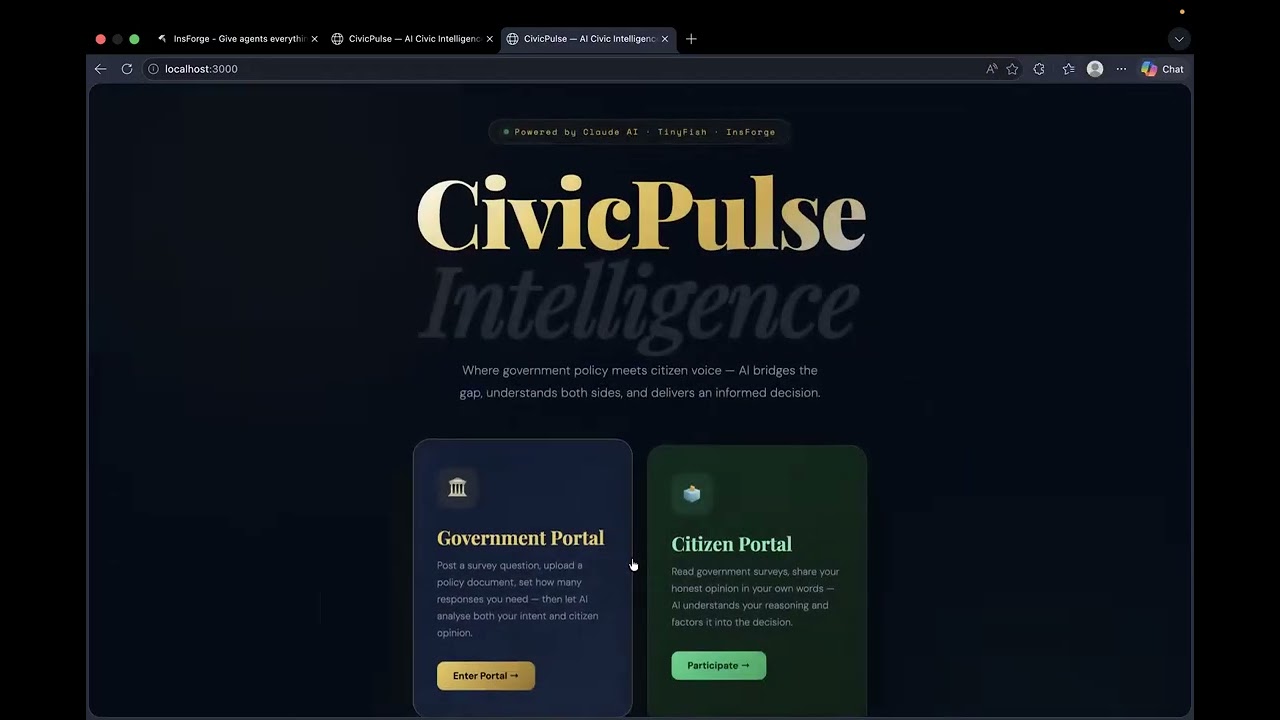
See the complete flow — from posting a government survey and uploading a policy PDF, to citizens submitting opinions and the AI generating a full decision report in real time.
💡 To display images: Add your screenshots to a
screenshots/folder in the repo and uncomment the<img>tags below.
 🏠 1. Landing Page
The entry point of CivicPulse — choose between the Government Portal (dark) or Citizen Portal (light) to get started |
 🔐 2. Government Portal Login
Secure, pre-authorised officer authentication — no public registration allowed; credentials are configured by the system administrator |
 📋 3. Government Portal — Post Survey
Officers write a policy question, optionally upload a supporting PDF/DOCX, and set the minimum citizen response target before publishing |
 📂 4. Government Portal — My Surveys
Dashboard showing all published surveys with live response counts and completion status — empty state before any surveys are posted |
 🔗 5. Government Portal — Service Connections
Real-time health status of all integrated services — Claude AI, InsForge Database, TinyFish Research, and the CivicPulse server, all confirmed online |
 🗳️ 6. Citizen Portal — Sign In
Citizens sign in with their registered username and password to access and respond to open government surveys |
 ✍️ 7. Citizen Portal — Create Account
New citizens register with a unique username and password (min. 6 characters) — passwords are bcrypt-hashed before storage |
 🔍 8. Citizen Portal — Awaiting Government Posts
The citizen dashboard before any surveys are published — surveys appear here automatically once a government officer posts one |
 📄 9. Government Portal — Survey with PDF Attached
A policy question filled in and a PDF uploaded (7k characters extracted) — AI will read the document to deeply understand government intent before analysis |
 📡 10. Government Portal — Survey Published & Collecting Opinions
The survey is now live with 1 post recorded; the system waits for the target number of citizen responses before auto-triggering AI analysis |
 💬 11. Citizen Portal — Active Survey Ready for Response
The government's published survey appears in the citizen dashboard; citizens write their opinion in free text — AI understands the full reasoning, not just keywords |
 ⚡ 12. Government Portal — Target Reached, Run Analysis
Once the minimum response target is met (2/2 here), the "Run Analysis with N Responses Now" button appears — government can trigger the AI pipeline on demand |
 🗄️ 13. InsForge DB — cp_surveys Table
The government-posted survey persisted in InsForge cloud database, showing the survey ID, question text, author (Amrish), response target, and attached policy document JSON |
 👤 14. InsForge DB — cp_users Table (Citizen Accounts)
Registered citizen accounts stored in InsForge — passwords are securely bcrypt-hashed ($2a$10$...) and never stored in plain text |
 📝 15. InsForge DB — cp_responses Table (Citizen Answers)
Each citizen's free-text response stored with their username, linked survey ID, and submission timestamp — this raw data feeds directly into the AI analysis pipeline |
 💾 16. InsForge DB — cp_analysis Table (AI Output Persisted)
The full AI decision report saved as 20 chunked string columns in InsForge — ensuring the analysis survives server restarts and remains accessible at any time |


 🏆 17. Government Portal — Live AI Decision Report
The complete AI-generated decision report displayed in the Government Portal: citizen sentiment bar (50% support / 50% neutral), win-win solution, recommended course of action, key statistics, urgency level, confidence score, and a "View Full Report" button — all deployed live at civicpulse-production.up.railway.app |
|
CivicPulse is a full-stack civic engagement platform that connects government officers with citizens in real time. Governments post policy surveys, citizens respond in free text, and an AI pipeline analyses the data — understanding government intent, citizen emotions, conflicts, and proposing win-win solutions.
| Feature | Description |
|---|---|
| 🏛️ Dual Portal System | Government Portal (dark theme) + Citizen Portal (light theme) |
| 🤖 AI Decision Report | Sentiment breakdown, conflict analysis, win-win solution, course of action |
| 🗄️ Persistent Cloud DB | InsForge PostgreSQL — all data survives restarts |
| 🔬 Real-World Research | TinyFish web research pulls policy precedents from Wikipedia |
| 🔐 JWT Auth | bcrypt-hashed passwords, 7-day tokens |
| 📄 PDF/DOCX Upload | Government attaches policy docs; AI reads up to 15,000 chars |
| ✉️ Follow-up Questions | Government can send targeted follow-up questions to citizens |
CivicPulse/
├── server.js              ← Single-file Express backend (889 lines)
│   ├── Config & env setup
│   ├── In-memory fallback store (no DB mode)
│   ├── InsForge REST helpers (ifGet/ifPost/ifPatch/ifDel)
│   ├── DB auto-init (creates 4 tables on startup)
│   ├── Auth middleware (JWT verify)
│   ├── REST API routes (10 endpoints)
│   ├── TinyFish SSE streaming client
│   └── triggerAnalysis() pipeline (6 steps)
├── public/
│   └── index.html         ← Full frontend SPA (1428 lines, vanilla JS)
│       ├── Landing page (dual portal selector)
│       ├── Government portal (login, post survey, my surveys, connections)
│       └── Citizen portal (login, register, browse & respond to surveys)
├── .env.example           ← Environment variable template
├── package.json           ← npm dependencies
└── skills-lock.json       ← Dependency lock
┌─────────────────────────────────────────────────────────────────┐
│                        CLIENT BROWSER                           │
│  ┌───────────────────────┐    ┌──────────────────────────────┐  │
│  │   Government Portal   │    │      Citizen Portal          │  │
│  │  (dark theme)         │    │   (light theme)              │  │
│  │  - Post surveys       │    │   - Register / Login         │  │
│  │  - Upload PDF/DOCX    │    │   - Browse open surveys      │  │
│  │  - View AI reports    │    │   - Submit free-text opinion │  │
│  │  - Send follow-ups    │    │   - See AI decision result   │  │
│  └───────────┬───────────┘    └──────────────┬───────────────┘  │
│              │  REST + JWT Bearer Token       │                  │
└──────────────┼────────────────────────────────┼──────────────────┘
               │                                │
               ▼                                ▼
┌─────────────────────────────────────────────────────────────────┐
│                   NODE.JS / EXPRESS SERVER                       │
│                                                                 │
│  ┌────────────────┐   ┌──────────────┐   ┌───────────────────┐ │
│  │  Auth Layer    │   │  API Routes  │   │  AI Pipeline      │ │
│  │                │   │              │   │  triggerAnalysis()│ │
│  │ • JWT verify   │   │ POST /login  │   │                   │ │
│  │ • Gov creds    │   │ POST /survey │   │ Step 1: Re-fetch  │ │
│  │   from .env    │   │ POST /resp.  │   │ Step 2: Extract   │ │
│  │ • bcrypt hash  │   │ POST /upload │   │         gov doc   │ │
│  │ • 7-day tokens │   │ GET  /surveys│   │ Step 3: TinyFish  │ │
│  └────────────────┘   │ GET  /resp.  │   │         research  │ │
│                       │ POST /ai     │   │ Step 4: Build     │ │
│  ┌────────────────┐   │ POST /resrch │   │         prompt    │ │
│  │ In-Memory      │   │ PATCH/survey │   │ Step 5: TinyFish  │ │
│  │ Fallback Store │   │ POST /shoot  │   │         AI call   │ │
│  │ (no InsForge)  │   │ GET  /status │   │ Step 6: Save &    │ │
│  │ mem.users[]    │   └──────────────┘   │         cache     │ │
│  │ mem.surveys[]  │                      └───────────────────┘ │
│  │ mem.responses[]│                                             │
│  │ analysisCache{}│                                             │
│  └────────────────┘                                             │
└──────────┬────────────────────────┬───────────────┬────────────┘
           │                        │               │
           ▼                        ▼               ▼
┌──────────────────┐  ┌─────────────────────┐  ┌───────────────┐
│   InsForge DB    │  │  Anthropic Claude   │  │  TinyFish AI  │
│ (Cloud Postgres) │  │  (AI Proxy /api/ai) │  │  (SSE stream) │
│                  │  │                     │  │               │
│  cp_users        │  │  claude-sonnet-4    │  │ Wikipedia     │
│  cp_surveys      │  │  max_tokens: 1000   │  │ scraping for  │
│  cp_responses    │  │  JWT-gated proxy    │  │ real-world    │
│  cp_analysis     │  │                     │  │ precedents    │
│  (20 chunks)     │  └─────────────────────┘  └───────────────┘
└──────────────────┘
CivicPulse auto-creates all tables on startup and drops+recreates them to ensure correct column types.
cp_users
├── id            uuid        PK (auto)
├── username      string      NOT NULL, UNIQUE
├── password_hash string      NOT NULL  ← bcrypt $2a$10$...
├── created_at    datetime
└── updated_at    datetime

cp_surveys
├── id               uuid      PK (auto)
├── question         string    NOT NULL
├── author           string    NOT NULL  ← gov officer username
├── target_responses integer             ← min responses before AI fires
├── context_json     string              ← JSON array with [GOV_DOC]: prefix
├── status           string              ← 'active' | 'complete'
├── analysis_json    string              ← legacy (unused, see cp_analysis)
└── published_at     datetime

cp_responses
├── id           uuid      PK (auto)
├── survey_id    string    FK → cp_surveys.id
├── username     string    FK → cp_users.username
├── answer       string    NOT NULL  ← free-text citizen opinion
└── submitted_at datetime

cp_analysis                          ← AI report stored in 20 chunks
├── id           uuid      PK (auto)
├── survey_id    string    UNIQUE FK → cp_surveys.id
├── chunk_0      string    ← 250 chars of JSON
├── chunk_1      string
├── ...
├── chunk_19     string    ← up to 5000 chars total JSON
└── created_at   datetime
Why chunking? InsForge string columns max out at ~255 chars. The AI report JSON can be 2000–5000 chars, so it's split into 20 × 250-char chunks on write and reassembled on read via
toChunks()/fromChunks().
Dual-mode storage: If
INSFORGE_URLis not set, the server falls back to a plain in-memory JS object (mem.users,mem.surveys,mem.responses) so the app works without any database configured.
Government Login                    Citizen Login / Register
─────────────────                   ────────────────────────
POST /api/auth/gov-login            POST /api/auth/register
  username + password                 username + password
       │                                     │
       ▼                                     ▼
  Check GOV_CREDS{}               bcrypt.hash(password, 10)
  (hardcoded in .env)             → store in cp_users (InsForge)
       │                                     │
       ▼                                     ▼
  jwt.sign({ role:'government' }) jwt.sign({ role:'citizen' })
       │                                     │
       └─────────── 7-day JWT ───────────────┘
                        │
                        ▼
              Bearer token in Authorization header
              → auth() middleware verifies on every
                protected route (surveys, responses,
                uploads, AI proxy, analysis trigger)
Triggered automatically when responses.length >= target_responses, or manually via the government portal button.
triggerAnalysis(survey, responses)
│
├── STEP 1 — Re-fetch fresh data
│   └── GET /cp_surveys/:id + GET /cp_responses?survey_id=eq.:id
│       (ensures latest data even if called with stale input)
│
├── STEP 2 — Extract government policy document
│   └── Parse survey.context_json (JSON array)
│       Find message with role:'system' and content starting '[GOV_DOC]:'
│       Extract up to 3000 chars as govDocSnippet
│
├── STEP 3 — TinyFish Wikipedia research (two parallel lookups)
│   ├── Search Wikipedia for policy precedents
│   │   → "real countries that implemented similar policies,
│   │      statistics, measurable outcomes, lessons learned"
│   └── Search Wikipedia for environmental/social impact data
│       → SSE stream from https://agent.tinyfish.ai/v1/automation/run-sse
│          20s hard timeout, processes data: events line-by-line
│
├── STEP 4 — Build comprehensive analysis prompt
│   └── Combines: survey question + gov doc snippet (3000 chars)
│               + citizen opinions (numbered list)
│               + Wikipedia precedent data (1000 chars)
│               + impact data (1000 chars)
│       Requests strict JSON output (no markdown, 23-field schema)
│
├── STEP 5 — TinyFish AI call
│   └── Sends full prompt to TinyFish as 'goal'
│       Parses JSON from SSE COMPLETE event
│       Falls back to regex JSON extraction if parsing fails
│       Falls back to rule-based sentiment analysis if TinyFish fails
│       (counts support/oppose keywords in citizen answers)
│
└── STEP 6 — Save & cache
    ├── analysisCache[survey.id] = analysisJson  ← in-memory (instant access)
    ├── saveAnalysisToIF() → toChunks() → INSERT/UPDATE cp_analysis
    └── PATCH cp_surveys/:id { status: 'complete' }
Analysis JSON schema (23 fields):
{
  "final_decision": "2-3 sentence AI recommendation",
  "government_intent": "what the government wants to achieve",
  "government_concern": "core problem being solved",
  "citizen_emotions": "emotional tone of responses",
  "citizen_concerns": "main citizen issues raised",
  "sentiment_breakdown": {
    "support_percent": 60,
    "oppose_percent": 30,
    "neutral_percent": 10,
    "support_reasons": ["..."],
    "oppose_reasons": ["..."]
  },
  "conflict_analysis": "where gov intent and citizen needs clash",
  "win_win_solution": "creative solution satisfying both sides",
  "alternative_approaches": [{ "name": "", "description": "", "benefits": "", "tradeoffs": "" }],
  "recommended_course_of_action": ["Step 1", "Step 2", "..."],
  "statistics": {
    "key_stats": ["stat with number"],
    "comparable_cases": ["real city + outcome"],
    "projected_impact": "expected outcome"
  },
  "pros": ["..."],
  "cons": ["..."],
  "environmental_social_factors": "context",
  "urgency": "LOW | MEDIUM | HIGH",
  "confidence": 85
}| Layer | Technology | Details |
|---|---|---|
| Backend | Node.js 18+ + Express | Single server.js, 889 lines |
| Frontend | Vanilla HTML/CSS/JS | Single index.html SPA, 1428 lines, no framework |
| Database | InsForge (Cloud PostgreSQL) | REST API, auto-provisioned tables, chunked JSON storage |
| AI Analysis | TinyFish AI | SSE streaming, Wikipedia scraping, 20s timeout |
| AI Proxy | Anthropic Claude (Sonnet 4) | JWT-gated /api/ai proxy endpoint |
| Auth | JWT + bcryptjs | 7-day tokens, cost-10 bcrypt, role-based (gov/citizen) |
| File Upload | multer + pdf-parse + mammoth | PDF & DOCX → up to 15,000 chars extracted |
| Deployment | Railway | Auto-deploy from GitHub, env vars via Railway dashboard |
| In-memory fallback | Plain JS objects | Works without any database if InsForge not configured |
git clone https://github.com/AmrishS2004/CivicPulse.git
cd CivicPulse
npm installcp .env.example .envOpen .env and fill in your keys:
| Variable | Where to Get |
|---|---|
ANTHROPIC_API_KEY |
console.anthropic.com |
INSFORGE_URL |
insforge.app → Create Project → copy URL |
INSFORGE_ADMIN_KEY |
InsForge → Settings → API Keys |
TINYFISH_API_KEY |
tinyfish.ai — 500 free steps |
JWT_SECRET |
Any long random string |
GOV_CREDENTIALS |
username:password pairs, comma-separated |
npm start          # production
npm run dev # development (auto-reload with nodemon)Visit http://localhost:3000
You should see:
✅ InsForge ready
🏛️ CivicPulse → http://localhost:3000
   AI:       ✅ Claude
   Backend:  ✅ InsForge
   Research: ✅ TinyFish
Government credentials are pre-configured in .env via GOV_CREDENTIALS. No self-registration is allowed for the government portal.
Default credentials (change in .env):
gov_admin     / Admin@2024
gov_officer   / Officer@2024
ministry_lead / Ministry@2024
CivicPulse auto-creates four tables in InsForge on startup:
| Table | Purpose |
|---|---|
cp_users |
Citizen accounts (bcrypt hashed passwords) |
cp_surveys |
Government surveys + uploaded document text |
cp_responses |
Citizen free-text responses |
cp_analysis |
AI analysis stored as 20 chunked string columns |
When the target response count is reached (or manually triggered):
1. Fetch      → pulls fresh survey + responses from InsForge
2. Extract    → parses uploaded policy document from context_json
3. Research   → TinyFish browses Wikipedia for real-world policy precedents
4. Analyse    → sentiment engine classifies each response (support / neutral / oppose)
5. Report     → builds 14-section decision report with win-win solution
6. Save       → chunks JSON into InsForge cp_analysis table (persists across restarts)
- ⚖️ Final Decision — AI-informed recommendation
- 📊 Citizen Sentiment Breakdown — visual bar with percentages
- ⚡ Conflict Analysis — identifies tensions between government intent and citizen concern
- 🏆 Win-Win Solution — bridges both sides
- 🗺️ Recommended Course of Action — step-by-step implementation plan
- 📈 Statistics & Comparable Cases — real-world data via TinyFish
- 💡 Alternative Approaches — what else could be done
- ✅ Pros & ❌ Cons — balanced view
| Method | Endpoint | Auth | Description |
|---|---|---|---|
| POST | /api/auth/register |
None | Register citizen |
| POST | /api/auth/login |
None | Citizen login |
| POST | /api/auth/gov-login |
None | Government login |
| GET | /api/surveys |
None | List all surveys |
| POST | /api/surveys |
Gov | Create survey |
| GET | /api/responses/:id |
None | Get responses |
| POST | /api/responses |
Citizen | Submit response |
| POST | /api/upload-doc |
Gov | Upload PDF/DOCX |
| POST | /api/admin/trigger-analysis/:id |
Gov | Manually trigger analysis |
| GET | /api/config/status |
None | Service health check |
npm install # installs everything from package.jsonCore: express · cors · dotenv · node-fetch · bcryptjs · jsonwebtoken · multer · pdf-parse · mammoth
- Email notifications when AI report is ready
- Multi-language citizen portal support
- Analytics dashboard for government officers
- Mobile app (React Native)
- Role-based access control within government portal
Amrish Sasikumar


Aravind Chidambaram


Nandita Ramkrishnan


This project is licensed under the MIT License — see the LICENSE file for details.
Made with ❤️ by Amrish Sasikumar, Aravind · Powered by Claude AI · InsForge · TinyFish
⭐ Star this repo if you found it useful!