

How it works
To use your own backend, click the “Connect Your Backend” button on your agent, and then set the Webhook URL to point to your backend’s endpoint.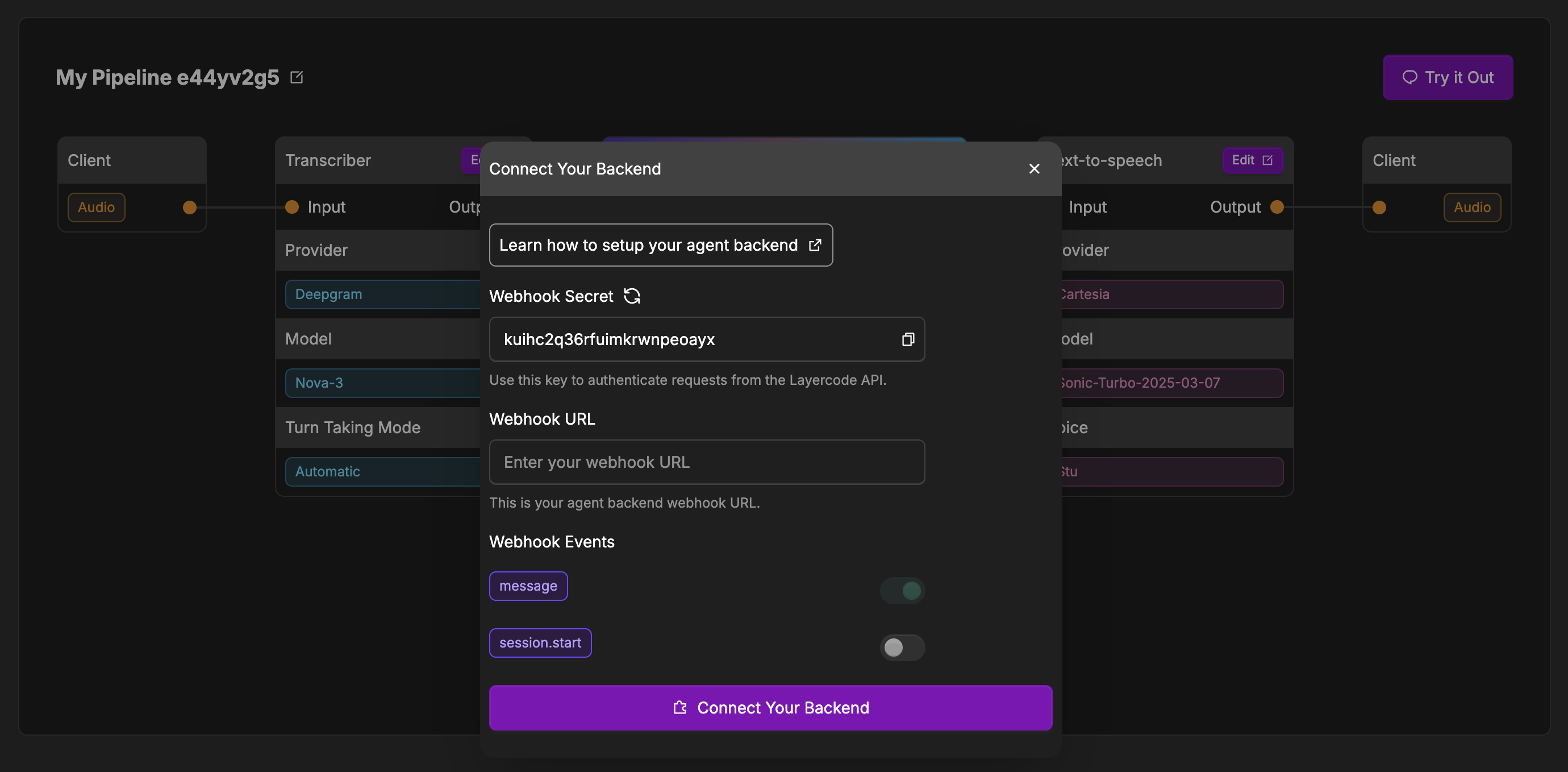
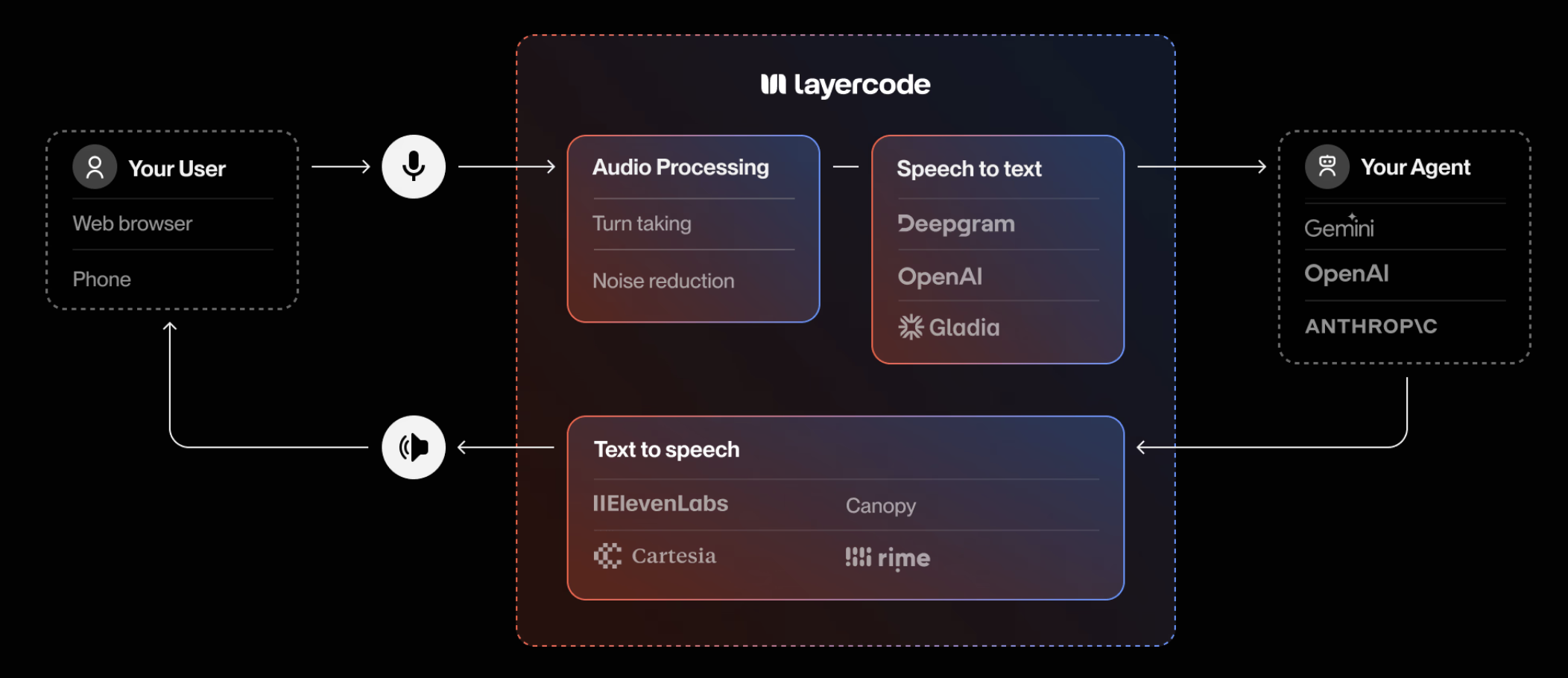
- Transcribe the user’s speech to text.
- Send an HTTP POST request to your backend at the Webhook URL you provide.
- Your backend responds with a Server-Sent Events (SSE) stream containing the agent’s reply (text to be spoken, and optional data).
- Layercode handles converting the text in your response to speech and streaming it back to the user in real time.
- Return of JSON data is also supported to allow you to pass state back to your UI.
Configuring Your Agent
- In the Layercode dashboard, open your agent and click Connect Your Backend (or click the edit button in the Your Backend box if you’ve already connected your backend previously).
- Enter your backend’s Webhook URL in the configuration modal.
- Optionally, configure which agent events you want to receive and (if needed) set a session webhook for lifecycle events (see below).
- Save your changes.
Agent Webhook Events
- message (required):
Sent when the user finishes speaking. Contains the transcribed message and metadata. Your backend should respond with an SSE stream containing the agent’s reply. - data (optional):
Fired when your client calls
response.data(e.g. HTMX forms, function invocations). Useful for reacting to structured payloads without speech. - welcome (optional):
Sent as soon as a session opens so your agent can greet the user proactively. If disabled, the agent waits for the user to speak first.
Session Webhook Events
Configure the optional session webhook to receive lifecycle callbacks separate from agent responses:- session.start – Fired when a session is authorized. Includes metadata, phone numbers, and IDs.
- session.end – Delivered after the bridge closes along with duration, transcript history, and latency metrics.
- session.update – Fired when recordings finish processing (e.g. transcription uploads). Requires session recording to be enabled for the org.
Webhook Verification
To ensure the security of your backend, it’s crucial to verify that incoming requests are indeed from Layercode. This can be done by verifying thelayercode-signature header, which contains a timestamp and a HMAC-SHA256 signature of the request body.
Here’s how you can verify the signature in your backend:
- Retrieve the
layercode-signatureheader from the request. It will be in the format:t=timestamp,v1=signature. - Get your Layercode webhook secret from the Layercode dashboard (found by going to the appropriate agent and clicking the edit button in the Your Backend box, where you’ll find the Webhook Secret).
- Reconstruct the signed payload by concatenating the timestamp, a period (
.), and the exact raw webhook request body:signed_payload = timestamp + "." + request_body. - Compute the HMAC-SHA256 signature of this signed payload using your webhook secret.
- Compare the computed signature with the
v1value from thelayercode-signatureheader. If they match, the request is valid. - (Recommended) Check that the timestamp is recent (for example, within 5 minutes) to prevent replay attacks.
Example: Webhook Request
When a user finishes speaking, Layercode will send a POST request to your webhook with the following JSON payload body:Example: SSE Response
Your backend should respond with an SSE stream. Each SSE message contains a JSON payload with the following fields:type, content (when required) and turn_id. See the Webhook SSE API documentation for details.