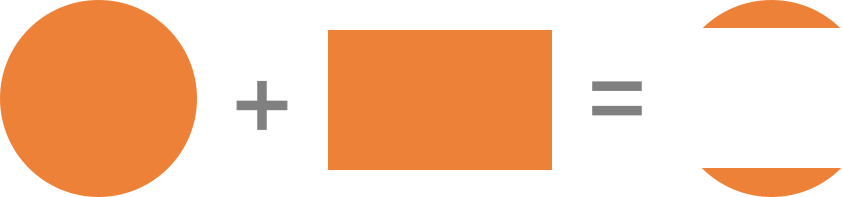
The mask-composite CSS property allows us to combine a mask layer image with the mask layers below it.
.element {
  mask-composite: subtract;
}
When there are multiple mask layer images, they need to be composited into one final mask layer. mask-compositespecifies how mask layers with different shapes are combined into a single image. Think of it like combining layers in an image editing app, like Photoshop, Figma or Sketch, where you have controls that set how the layers are combined.
Combining two layers in Sketch
Or, another way to think about it:
The second layer (rectangle) is subtracted from the first layer (circle).
For the composition, the mask layer image that the mask-composite value is applied to is the source, while all mask layers below it are the destination.
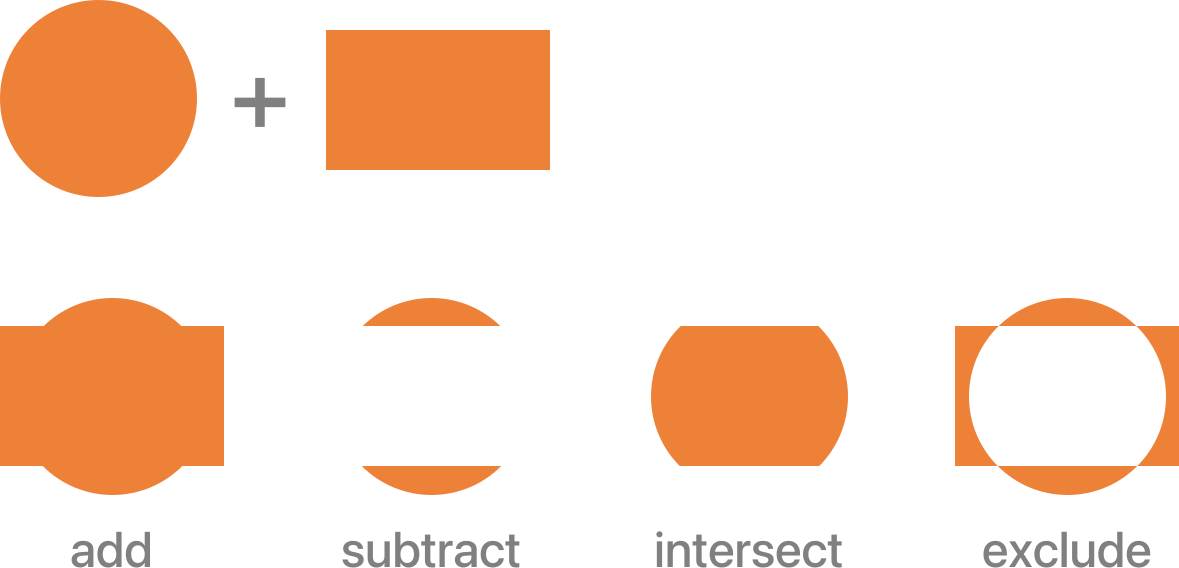
add: The default value. The mask image layer closer to the user (source) is placed on top of the next mask image layer (destination). The combination is the final mask layer.
subtract: The mask image layer closer to the user is placed where it falls outside of the next mask image layer. In other words, the final combination is portions of the destination that don’t overlap the source.
intersect: The portions of source that overlap the destination replace the destination. In other words, the final combination is portions of the destination that overlap the source.
exclude: The non-overlapping regions of source and destination are combined.
initial: Applies the property’s default value, add.
inherit: Adopts the mask-composite value of the parent.
unset: Removes the current mask-composite from the element.
Example
In the following example, two mask image layers are combined using exclude value:
At the time of writing, this example works only in Firefox.
Using multiple values
This property can take a comma-separated list of values for mask compositing and the number of values is one value less than the number of mask images specified using mask-image.
In the following example:
the first value specifies the composite operation of the second image with the third one, and
the second value is used to perform the composite operation of the first mask image with the result obtained from the first operation.
And so on for any number of mask layer images. Remember, the first image specified is placed on top of the ones specified after it.