##description##
align-items

34 Cross
on
Updated on
Ad
The align-items property is related to CSS layout. It effects how elements are aligned both in Flexbox and Grid layouts.
.container {
  display: flex;
  align-items: flex-start;
}align-items: flex-start | flex-end | center | baseline | stretch
The align-items property defines the default behavior for how items are laid out along the cross axis (perpendicular to the main axis).
Imagine a horizontal flexbox layout. That horizontal flow is the main axis, so align-items is the alignment opposite that, on the vertical axis. Bear in mind that changes when the main axis changes, and the cross axis changes with it.
You can think of align-items as the justify-content version for the cross-axis (perpendicular to the main-axis).
The rest of this article is fairly focused on flexbox rather than grid. The concepts are still very similar, but there are some differences. For example, in flexbox, the axises can change, where in grid they cannot. That effects things like flexbox having values like flex-start where in grid it is just start.
The align-items property accepts 5 different values:
flex-start: cross-start margin edge of the items is placed on the cross-start lineflex-end: cross-end margin edge of the items is placed on the cross-end linecenter: items are centered in the cross-axisbaseline: items are aligned such as their baselines alignstretch (default): stretch to fill the container (still respect min-width/max-width)The following figure helps understand how flex items are layed out depending on the align-items value.
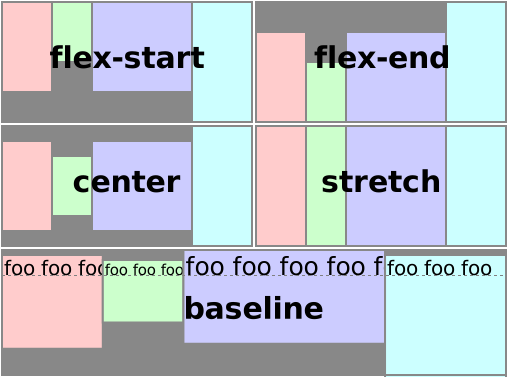
The following demo shows how flex items are layed out depending on the align-items value:
flex-startflex-endcenterbaselinestretchBrowser support for align-items varies in its usage with flexbox and CSS Grid.


There is an edge case bug with Firefox and align-items: baseline.
https://bugzilla.mozilla.org/show_bug.cgi?id=1036404
Thank you very much
This training was very useful for me.
Question for you, on the codepen demo ‘baseline’ case, let’s say I wanted that 3rd green box to align to the “5” instead of the 4. How would I do that?
It looks like
flex-endis now justendI’m pretty sure that change is made in the CSS Box Alignment Module Level 3 Working draft and isn’t a candidate recommendation yet.
IMHO, they aren’t the same.