Creative

1.5M ratings
277k ratings

See, that’s what the app is perfect for.

Sounds perfect Wahhhh, I don’t wanna
staff
staff

Reblogs, likes, replies, @mentions—these interactions already show up on your desktop activity screen. You knew that. What you might not already know is that you can now filter different activity types on mobile.

Want to see @ mentions, replies, or reblogs separately on the go? Simply tap “All Activity” in the app, and pick from the drop-down menu that appears. Want to see how folks are interacting with your post about frogs in the kitchen? It’s all here—choose the “Custom” option and tailor your activity screen to suit your lifestyle. That’s really all there is to it. ✨

staff

We made this post just for you. Tell your friends. Or don’t. We’re not your boss.

staff

Hey there! 

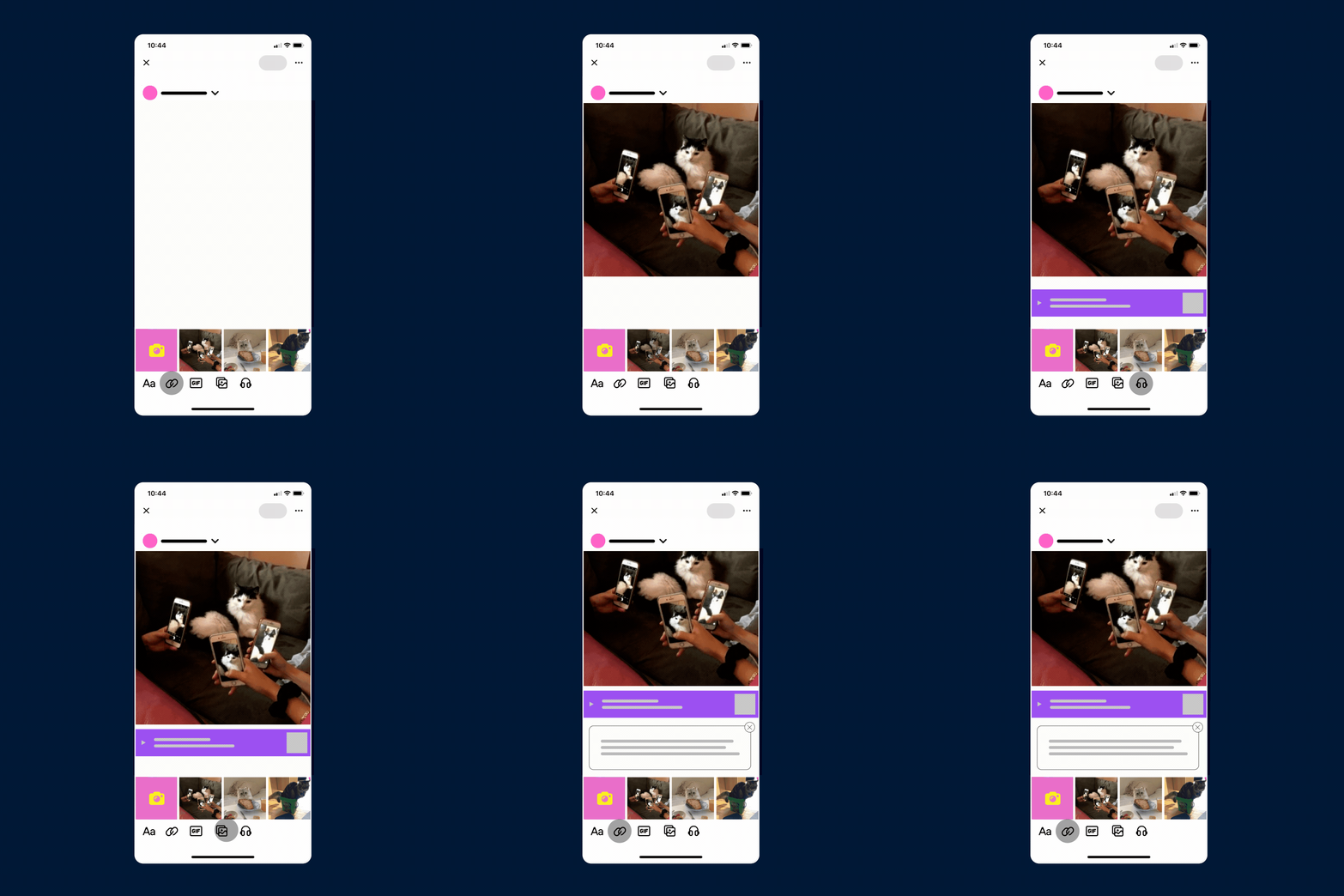
Real quick: We made a couple of tiny tweaks to streamline posting in our mobile apps.

image

The first position in your mini media picker is now your catch-all camera button to add a brand new photo, video, or GIF. Speaking of GIFs,  create your own GIF using any video in your camera roll by tapping “GIF.” Select up to three seconds from your video, speed it up, slow it down, or play it in reverse.  A little less clutter, a lot more functionality.

image

Once you’re ready to publish, tap that “Post” button (well, duh) or long-press it to unleash a colorful cascade of options to queue, schedule, save as a draft, or post privately like it’s a special little secret only for you and you alone. 

Happy posting, bud.

woo
staff
staff

image


Have a post you’re particularly proud of? Something that you want to make sure everyone sees as soon as they visit your Tumblr? Then you’re gonna love this:

Pinned posts are here! Whether you’re on desktop or mobile, this little tool will pin the post of your choosing to the top of your Tumblr. Your dashboard will remain unaffected. Just tap the meatballs menu (●●●) on the upper right-hand corner of your post, slam your finger down on “Pin,” and you’re in business, baby. The business of pinning posts. 

Questions? Answers.

staff
staff

image

Get your swiping fingers ready

There’s a brand new way to post pictures, videos, and Loops you make with the Tumblr camera. We made some tweaks to the existing camera features and even added a few new creative tools. The best part? It’s easier than ever to get there. All you have to do is swipe right on your dashboard while you’re in the app. We’ve conferred with the leading experts in science, math, and fingers and they all agreed this makes it 1250% times faster to get to the camera. Nearly unbelievable.

Upon swiping right, you’ll see a familiar button at the top of your screen that says “Normal.” There are three different modes to nab your content, and you can switch between them by tapping that button. “Normal” takes pictures and videos, “Stitch” allows you to take and string together a series of pictures or videos in one video file, and “Loop” creates a moving image that plays backward and forward in a, well, you know…a loop.

image

Some of the fun stuff that already existed just got a little facelift, some of it is brand new, and all of it is in your app right now (as long as you’re running version 15.4 or later of the Tumblr app).

What’s new?

  • Editing from your camera roll! Up until now, you could only use our newer filters on pictures and videos you took in the app. Now you can throw those puppies on photos and videos you’ve already saved to your phone.
  • You can draw! Tap that squiggle at the bottom of the screen after you take your picture, video, or Loop and find a whole new set of drawing tools. Tap the color wheel to open the color bar and choose your desired hue. You can get real nitty-gritty with how concentrated you want the color to be by pressing and holding on the color bar to bring up more detailed options. There’s an eraser tool, three different types of tips, and tapping that little dot all the way on the bottom left side of your screen reveals the ability to change the width of your lines.

What’s better?

  • Filters! Up until yesterday, you could only use one filter at a time. Now you can layer two on top of each other. Big change? Nah. Just better.
  • Ghost overlay! When you’re in Stitch mode and you want to line up consecutive shots for a seamless transition, just tap the ghost overlay icon for a ghostly frame to pop up in your camera’s view. The icon will be on the left side of your screen and kinda looks like a sandwich with a transparent piece of bread on top.
  • Adding text! The fonts are updated to match the fonts you can use in posts and you can add background colors to make them easier to read.
  • Stickers! Some stickers that were hardly used are gone, but all of the favorites remain. (We could never get rid of thicc corgi.) We added a few new ones, too. Just tap that smiley face pal at the bottom of your graphic.

Questions? Head on over to our Help Center for those sweet, sweet answers. As always, we’re still tweaking and finessing behind the scenes. There’s more to come for this creative canvas. Keep your eyes peeled for more creative tools to help you, ya know, create. We just wanted to get this quick update out to you as soon as possible. Play around with it and let us know what you think. We always keep our eyes on the notes of these feature update posts. If you make something you’re proud of, post your creation with the tag #TumblrCreates. We’ll promote the best of the best on Tumblr or our social media.

staff
staff:
“Oh, no. Oh, dear. We have awful news. We accidentally added group chats to Tumblr.Group chats are a place for you to connect with other people on Tumblr to discuss things that are important to you—like long Furby, or your favorite...
staff

Oh, no. Oh, dear. We have awful news. We accidentally added group chats to Tumblr.

Group chats are a place for you to connect with other people on Tumblr to discuss things that are important to you—like long Furby, or your favorite fandom.

It’s terribly upsetting, but this is going to make it even easier to connect with like-minded people and find new communities you might not know existed.

We have no idea how this came to be

Each group chat can hold up to 100 members. To make matters worse, you can create and join as many group chats as your beating heart desires.

The only good news we can give at this time

Group chats must be a friendly and welcoming space for everyone. When you create a group chat, you become the sole owner and are responsible for how it is run. You alone can invite new members and accept or deny incoming requests to join. Just remember: group chats are publicly viewable, and while only members may participate, anyone on Tumblr can see its contents.

As the owner of a group chat, you possess the power to remove any member or message you feel needs to be removed. However, you do not need to be the owner or even a member to report a violation of our hate speech policy or other aspects of our Community Guidelines. Reports will be properly dealt with by our Trust & Safety team.

Phew

We hesitate to tell you this, but to learn more about how to use group chats, head on over to our Help Center. It’s full of tips, tricks, and helpful information. Disgusting. We’re so sorry.

You’ve been warned. We can’t protect you from the truth any longer.

To find existing group chats, just search for them in the app like you would any ol’ topic. If you don’t see what you want, consider being your own hero and making your own. Just tap the new group chat icon in the upper right-hand corner of your dashboard or simply swipe left from the dashboard. There you will see all of the group chats you own or use, as well as the option to make a brand new one by tapping the “+” in the right-hand corner. Make sure you’re using version 14.5.1 or you’ll be spared the horrors of good conversation and finding new friends.

unwrapping
staff

Hey!

Good news: You can now add alt text to every photo and GIF you upload to a post with your Tumblr iOS or Android app.

What?

Alt text! It’s a textual alternative to a photo or GIF, so anyone who uses a screen reader will know what you’ve posted. If you post, say, a long Furby sitting on a couch, you might provide alt text that says “a long Furby sitting on a couch” so anyone who needs to use a screen reader gets to join in on the fun. Keep it short, keep it descriptive. 

How?

Easy-peasy. When you add an image or GIF to a post or reblog on Tumblr in the iOS or Android app, you’ll see a meatballs menu (●●●) pop up in the lower right-hand corner of your image or GIF. Tap it, then select “Add alt text.” 

Why?

We’re continuing our efforts to make Tumblr more accessible in accordance with the Web Accessibility Initiative of the World Wide Web Consortium. They’re an initiative that sets standards for accessibility for people who may need assistance using the internet.

Happy alt texting, Tumblr!

staff
staff:
“ There’s a big change coming to your Tumblr experience…but only if you want it.
We’re introducing the Color Palette! It’s giving you the power to control the color of your dashboard (and the rest of our blue space) in your iOS and Android...
staff

There’s a big change coming to your Tumblr experience…but only if you want it.

We’re introducing the Color Palette! It’s giving you the power to control the color of your dashboard (and the rest of our blue space) in your iOS and Android apps and on mobile web.

You can currently choose from three options:

  • True Blue, our default color scheme.
  • Dark Mode, for when you want to turn down the lights.
  • Low-Contrast Classic, our new low-contrast color scheme, complete with an old familiar blue so many of you love.
image

To check it out, just go to your settings in the app by tapping the silhouette icon, visiting “General settings,” and selecting “Color Palette.” 

Questions? We’ve got you covered.

tumblr update staff