A Python wrapper for the Dynamsoft Barcode Reader SDK, providing simple and user-friendly APIs across Windows, Linux, and macOS. Compatible with desktop PCs, embedded devices, Raspberry Pi, and Jetson Nano.
Note: This is an unofficial, community-maintained wrapper. For official support and full feature coverage, consider the Dynamsoft Capture Vision Bundle on PyPI.
| Feature | Community Wrapper | Official Dynamsoft SDK |
|---|---|---|
| Support | Community-driven | ✅ Official Dynamsoft support |
| Documentation | Basic README and limited examples | ✅ Comprehensive online documentation |
| API Coverage | Core features only | ✅ Full API coverage |
| Updates | May lag behind | ✅ Always includes the latest features |
| Testing | Tested in limited environments | ✅ Thoroughly tested |
| API Usage | ✅ Simple and intuitive | More complex and verbose |
-
Python 3.x
-
OpenCV (for UI display)
pip install opencv-python
-
Dynamsoft Capture Vision Bundle SDK
pip install dynamsoft-capture-vision-bundle
# Source distribution
python setup.py sdist

# Build wheel
python setup.py bdist_wheelimport barcodeQrSDK
# Initialize with trial license
error_code, error_msg = barcodeQrSDK.initLicense("LICENSE-KEY")
if error_code != 0:
print(f"License error: {error_msg}")
exit()# Create reader instance
reader = barcodeQrSDK.createInstance()
# Decode from file
results = reader.decodeFile("barcode_image.jpg")
# Process results
for barcode in results:
print(f"Format: {barcode.format}")
print(f"Text: {barcode.text}")
print(f"Location: ({barcode.x1}, {barcode.y1}), ({barcode.x2}, {barcode.y2}), ({barcode.x3}, {barcode.y3}), ({barcode.x4}, {barcode.y4})")import cv2
import numpy as np
detected_barcodes = []
def on_barcode_detected(barcodes):
"""Callback function for async detection"""
global detected_barcodes
detected_barcodes = barcodes
for barcode in barcodes:
print(f"Detected: {barcode.text} ({barcode.format})")
def main():
# Initialize
barcodeQrSDK.initLicense("YOUR_LICENSE_KEY")
reader = barcodeQrSDK.createInstance()
# Start async detection
reader.addAsyncListener(on_barcode_detected)
# Camera capture loop
cap = cv2.VideoCapture(0)
while True:
ret, frame = cap.read()
if not ret:
break
# Send frame for async processing
reader.decodeMatAsync(frame)
# Draw detection results
for barcode in detected_barcodes:
# Draw bounding box
points = np.array([
[barcode.x1, barcode.y1], [barcode.x2, barcode.y2],
[barcode.x3, barcode.y3], [barcode.x4, barcode.y4]
], dtype=np.int32)
cv2.drawContours(frame, [points], -1, (0, 255, 0), 2)
cv2.putText(frame, barcode.text, (barcode.x1, barcode.y1),
cv2.FONT_HERSHEY_SIMPLEX, 0.8, (0, 255, 0), 2)
cv2.imshow('Barcode Scanner', frame)
if cv2.waitKey(1) & 0xFF == ord('q'):
break
# Cleanup
reader.clearAsyncListener()
cap.release()
cv2.destroyAllWindows()
if __name__ == '__main__':
main()# Basic scanning
scanbarcode image.jpg -l YOUR_LICENSE_KEY
# With visual display
scanbarcode image.jpg -u 1 -l YOUR_LICENSE_KEY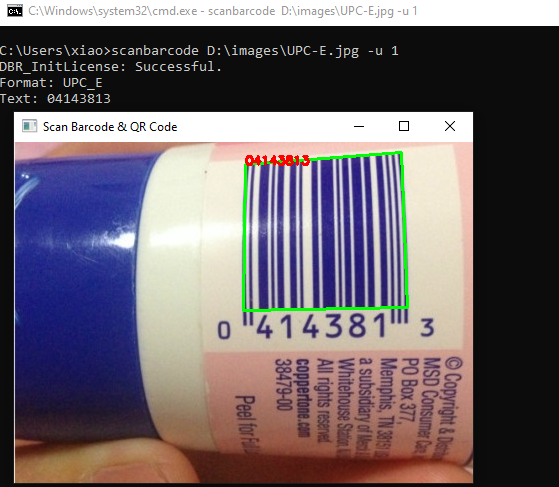
Initialize the SDK with your license key.
error_code, error_msg = barcodeQrSDK.initLicense("YOUR_LICENSE_KEY")Returns: (error_code: int, error_message: str)
Create a new barcode reader instance.
reader = barcodeQrSDK.createInstance()Decode barcodes from an image file.
results = reader.decodeFile("path/to/image.jpg")Supported formats: JPEG, PNG, BMP, TIFF, GIF
Decode barcodes from an OpenCV image matrix.
import cv2
image = cv2.imread("image.jpg")
results = reader.decodeMat(image)Decode barcodes from raw image bytes.
from dynamsoft_capture_vision_bundle import EnumImagePixelFormat

results = reader.decodeBytes(
    image_bytes, 640, 480, 1920,
    EnumImagePixelFormat.IPF_RGB_888
)Start real-time barcode detection with callback.
def on_detection(barcodes):
    for barcode in barcodes:
        print(f"Found: {barcode.text}")

reader.addAsyncListener(on_detection)Process OpenCV image asynchronously.
reader.decodeMatAsync(camera_frame)Process raw bytes asynchronously.
reader.decodeBytesAsync(raw_bytes, width, height, stride, pixel_format)Stop async detection and cleanup.
reader.clearAsyncListener()Get current detection parameters as JSON.
params_json = reader.getParameters()Set detection parameters from JSON.
error_code, error_msg = reader.setParameters(modified_params)Each detected barcode returns a BarcodeResult object with:
class BarcodeResult:
    text: str           # Decoded text content
    format: str         # Barcode format (e.g., "QR_CODE", "CODE_128")

    # Corner coordinates
    x1, y1: float
    x2, y2: float
    x3, y3: float
x4, y4: float Convert OpenCV matrix to SDK format.
image_data = barcodeQrSDK.convertMat2ImageData(cv_image)-
Linear Barcodes (1D)
- Code 39 (including Code 39 Extended)
- Code 93
- Code 128
- Codabar
- Interleaved 2 of 5
- EAN-8
- EAN-13
- UPC-A
- UPC-E
- Industrial 2 of 5
-
2D Barcodes:
- QR Code (including Micro QR Code)
- Data Matrix
- PDF417 (including Micro PDF417)
- Aztec Code
- MaxiCode (mode 2-5)
-
Patch Code
-
GS1 Composite Code